


 Facebook
 Twitter
 YouTube
 Flickr
 Shop
Shop Ebay
Ebay Rss Feed
Pdf To DjVu GUI - Official Page
Latest Version : 2.5
About :
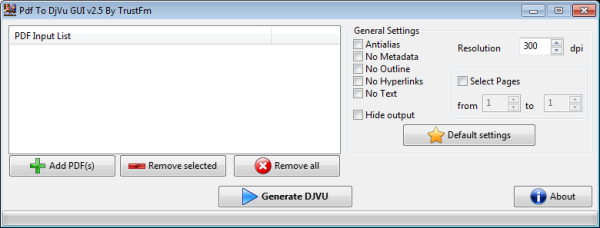
Pdf To DjVu Gui is a free application that converts any PDF into DjVu.
DjVu files are generally smaller than the PDF files and are good looking.
Advantages and disadvantages of PDF and DjVu formats can be found at Wikisource.
Pdf to DjVu Gui from the version 2.0 and above is portable that means that the application does not need installation.
Works under Windows XP, Vista, 7 , 8 and Linux.
Pdf To DjVu Gui is based on pdf2djvu
Before downloading Pdf To DjVu GUI take a look at the online documentation page.
Based On :
pdf2djvu - A PDF to DjVu command line tool for Linux. Version 0.7.14
I would like to thanks personally Jakub Wilk, the author of pdf2djvu, which responded to all of my questions.
Without him this project would not be possible to make.
Changelog :
Whats new v.2.5 :
Updated : pdf2djvu win32 version 0.7.14
Updated : Open-link library for the about box
Added : icons on buttons
Fixed : Better Linux support
Whats new v.2.1 :
Updated : pdf2djvu 0.7.3 added for win32
Fixed : Pop up bug on the updater in the about box
Notice : Windows update version. The newest version for Linux remains the 2.0
Whats new v.2.0 :
New : Linux Version
New : Portable Win32 version
Updated : Cygwin is not needed anymore
Whats new v.1.1 :
Updated : pdf2djvu
Updated : Poppler
Updated : Installer
Fixed : More pdf files can be converted with this version.
(DjVuLibre v.3.5.19, Poppler v.0.8.2, pstreams v.0.5.2, pdf2djvu v.0.4.10)
Whats new v.1.0 :
First official and public release.
(DjVuLibre v.3.5.19, Poppler v.0.5.4, pstreams v.0.5.2, pdf2djvu v.0.4.6)
Updated : pdf2djvu win32 version 0.7.14
Updated : Open-link library for the about box
Added : icons on buttons
Fixed : Better Linux support
Whats new v.2.1 :
Updated : pdf2djvu 0.7.3 added for win32
Fixed : Pop up bug on the updater in the about box
Notice : Windows update version. The newest version for Linux remains the 2.0
Whats new v.2.0 :
New : Linux Version
New : Portable Win32 version
Updated : Cygwin is not needed anymore
Whats new v.1.1 :
Updated : pdf2djvu
Updated : Poppler
Updated : Installer
Fixed : More pdf files can be converted with this version.
(DjVuLibre v.3.5.19, Poppler v.0.8.2, pstreams v.0.5.2, pdf2djvu v.0.4.10)
Whats new v.1.0 :
First official and public release.
(DjVuLibre v.3.5.19, Poppler v.0.5.4, pstreams v.0.5.2, pdf2djvu v.0.4.6)
Pad file for updates can be found here :
http://www.trustfm.net/GeneralTools/Downloads/PdfToDjvuGUI