


 Facebook
 Twitter
 YouTube
 Flickr
 Shop
Shop Ebay
Ebay Rss Feed
Foto2Avi - Official page
Latest Version : 4.4 (Freeware)
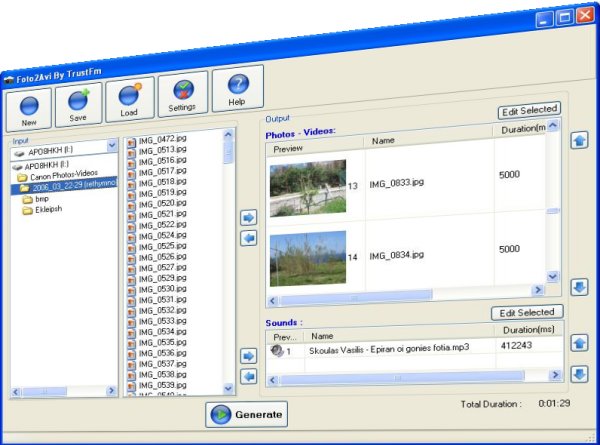
About : Foto2Avi is a freeware video/photo converter to avi/mkv/mp4/mpeg/flv. It is a video editor too. Foto2Avi can create video slideshows from photos or can be used as a regular video editor in order to cut or join video files.
The video result can be exported as a single video file, like avi or as DVD format since DVD authoring is internally supported.
The newer Foto2Avi versions can generate High Definition videos (HD) with quality similar to Blu-ray.
If your video source is good enough or your photos have a decent resolution (more than 4 megapixel) you can easily generate up to 1080p resolution videos using the x264 codec as encoder from the video settings.
Notice that Foto2Avi uses only free software like ffmpeg.
A lot of video special effects come already bundled with Foto2Avi like :
Transitions (Flippage,Swirl...)
Basic Effects (Brightness/Noise/Fade in/Fade out)
Advanced Effects (Distort, Ripple)
Animations
Subtitles
Logos
Any of these effects is highy customizable.
You have thousands of effecs right out of the box !
The only limit is your imagination...
Foto2Avi supports external audio sounds [ac3/mp3/ogg/wav]
Include audio effects like fade in fade out or echo.
From the version 3.2 dolby surround sound 5.1 is supported as input and as output.
Foto2Avi can trim audio and video streams with milisecond precision.
You can edit your sounds and synchronize them with your videos.
Save your work as *.f2a (Foto2Avi project file) and reload it later.
Foto2Avi works under Windows Xp, Vista, 7 and Windows 8.
 |
Foto2Avi is easy to use after a couple of minutes using it, you will be able to produce your own films.
Foto2Avi is fast if you use it correctly
Foto2Avi can be optimized ! Take a look for tips and tricks on our forum
It is ideal for youtube videos or any presentation videos.
If you have run out of ideas just load the Demo.f2a that comes bundled with Foto2Avi.
It is located on :
C:\Program Files\Foto2Avi\Demos\Demo.f2a
This sofware can be also used and as video converter. For example can be used as avi to flv converter. You have a lot of episodes with different charateristics (different aspect ratios, fps etc ...) and you want to join them? Use Foto2Avi for this job.
Before downloading take a look at the features and the online documentation section to find out how to use Foto2Avi and check out for tips and tricks!
If you have problems or need support contact us using the Foto2Avi Official Forum
Foto2Avi uses heavily avisynth and ffmpeg.
Pad file for updates can be found here :
http://repository.appvisor.com/info/app-cc004c920d49/Foto2Avi_pad.xml
Awards :






ChangeLog :
What's new in ver. 4.4 :
Fixed : Logo effect
Updated : Gui inteface
Updated : bug fixed version
What's new in ver. 4.3 :
Added : ConvertFPS feature (synch problems fixed)
Fixed : howmanyframes bug
Updated : EffectsMany
Updated : TransAll
Updated : AddGrainC
Updated : AviSynth 2.6.0 [150114]
Updated : FFDShow MPEG-4 Video Decoder 2014-09-29 [ffdshow_rev4533_20140929_clsid]
Updated : FFMPEG [ffmpeg-20150218-git-8bc8001-win32-static]
Updated : dvdauthor 0.7.1
What's new in ver. 4.2 :
Added : Hard (permanent) subtitle support for file mode (avi/mkv/mp4/flv/mpeg)
Added : Soft (selectable) subtitle support for mkv
Added : srt,ssa,ass subtitle support
Fixed : Progress bar
Updated : ffmpeg version [ffmpeg-20121105-git-c995644-win32-static]
What's new in ver. 4.1 :
Info : A bugfix release
Fixed : Time calculator
Fixed : Problems with RAW video
Added : Deinterlace (Use it on interlaced sources)
What's new in ver. 4.0 :
Info : This is major update
Added : Better Windows 7 Vista support
Added : Better x264 support
Added : Higher bitrates can be set. The old limit was 9800 kbps
Added : New version of ffmpeg [ffmpeg-git-4082198-win32-static]
Added : Insert time values from HH:MM:SS calculator to Foto2Avi
Updated : Previewer. Totally new version
Updated : Ported to new compiler
Updated : Installer's informations
Whats new in ver. 3.4 :
Added : Audio from video / audio from sound files mix level added at settings
Added : Better file sound audio level on muted videos
Fixed : Drag and drop option under Win7 and Windows Vista
Fixed : Audio Gui sec labels added
Updated : Better support for Win7
Updated : Update option
Updated : About Box
What's new in ver. 3.3 :
Added : Capturing (FFV1) input supported
Added : Disable thumbnail preview
Added : 360p and 480p 16:9 Youtube resolutions (640x360 and 864x480)
Fixed : transmask effect
Updated : Donation button
Updated : About Box
What's new in ver. 3.2 :
Added : Surround Sound 5.1 input and output support. From now on you can produce Dolby Digital Surround Sound video files.
Added : Dvd with 5.1 Dolby Digital Surround Sound
Added : WAV 5.1, AC3 and OGG 5.1 input audio support
Added : MKV and MP4 output support
Added : Easier load and unload media process
Added : Horizontal and vertical splitter bars
Added : Disable form on the preview and convert process
Added : Better drag and drop option (clear selecte button added)
Updated : animation 9999 from 999
Fixed : Backspace allowed in chapter edit box
Fixed : About box
Fixed : The vertical splitter on the file list box
What's new in ver. 3.1 :
Added : f2a extension can be associated with Foto2Avi from the General Settings. (Registry modification is needed so you have to run Foto2Avi as administrator under Vista and Win7)
Added : Handy hh:mm:ss.mmm to ms converter in video and audio form
Added : Confirmation needed when saving the same f2a project
Fixed : Xvid output option fixed (aspect ratio)
Fixed : Bug saving over the same f2a file
What's new in ver. 3.0 :
Added : Sound Effects. Fade in, fade out and echo are the first three audio effects supported. More audio effects to come later.
Added : HD output support, 1080p supported
Added : Encode with the x264 codec. Now you can get excellent HD quality results with this option.
Added : Audio AAC is supported as output.
Added : Mkv and mp4 formats are supported as input.
Updated : EffectsMany
Updated : Transall
Updated : ffmpeg ver 18639
Updated : avisynth 2.5.8
What's new in ver. 2.2 :
Fixed : On load duration bug
Fixed : Save settings
Fixed : Save latest resolution
Updated : Improved preview window
What's new in ver. 2.1 :
Added : Resize/Aspect Ratios with ITU-R BT.601-4 standards
Added : Drag and drop support
Added : Dvd bitrate
Added : Select Dvd size
Added : Select Dvd aspect ratio
Added : Select Audio Format in dvd mode
Added : Select Audio Bitrate in dvd mode
Added : Select Audio Language in dvd mode
Added : Two pass encoding in dvd mode
Fixed : Abort option
What's new in ver. 2.0 :
Added : Animated subtitles !
Added : Animation free effect. (Really cool effect)
Added New MaskTransition
Added : New transitions can be made by the users (Look on our forums to learn how to do your own transitions. You can share them with us !)
Added : New Dissolve transiion
Added : 24 New Transitions
Optimized : Order of the Video List
Fixed : Focus on listviews
Fixed : Animations
Fixed : Loading older projects
What's new in ver. 1.9 :
Fixed : Manual position of subtitles did not worked
Fixed : Small bugs with older *.f2a projects
Updated : Gui and how to use instructions
What's new in ver. 1.8 :
Fixed : Main form of Foto2avi at 120 Dpi (Large Size) on windows now should look quite well
Fixed : Avi was not generated if the output fps was 23.976 or 29.970
Fixed : Now the option "avi (xvid)" should work
What's new in ver. 1.7 :
Added : First non beta release
Added : Input support for mov files.
Added : Input support for wmv files.
Added : Input support for flv files. On all of these input files (mov/wmv/flv) you need the correct directshow filters . Please take a look on our forum to find out how you can load correctly these kind of files on Foto2Avi!
Added : Output support for dvd author. Now Foto2Avi can generate dvd projects. In order to burn the dvd compilation take a look at our forums.
Added : Two output modes. File mode / Dvd mode
Added : 'Keep aspect ratio' on Photos and on videos option (add bars in order to keep the correct aspect ratio)
Added : Color option of the aspect ratio bars
Added : Two pass convertion on file mode
Added : Chapters possibility on dvd mode
Updated : New version of ffmpeg [ver. rev9767]
What's new in ver. 1.6 beta :
Added : Logo motion mask (avi) added (with this trick you can do some spectacular video effects . Guides can be found later on our forums.) This option is really cool !
Added : Order Effects option. Again this feauture is a must ! Now you can order your effects ;)
Added : Video at 30 fps option
Added : Zoom at 900%
Added : No filter registration. Dynamic use of them.
[The only exeption is the registration of oggDS.dll]. This option makes Foto2Avi 100% compatible with avi2dvd
Added : Previewer has now two modes : VmNormal and VmVmr.
VmVmr is the default option.
With VmNormal you can use the previewer with remote desktop applications (like vnc). (With the VmVmr you see only a black screen).
Fixed : Logo tolerance attribute.
Fixed : Some values were not correctly refreshed (subtitle size etc...)
Fixed : Minimization previewer window
What's new in ver. 1.5 beta :
Updated : Foto2Avi is now indipendent from avisynth's errors (Stabler version)
Fixed : Indipendent Previewer (new process).
Even if avisynth crashes Foto2avi will not crash anymore (Important update)
What's new in ver. 1.4 beta :
Fixed : Basic Effects YUV Support (for seppia,tweak)
Fixed : Advanced effects errors
What's new in ver. 1.3 beta :
Fixed : Optimized preview window
Fixed : Safer seeking
Fixed : Preview window did not showed avisynth errors
Fixed : Blank preview window is some cases
Fixed : jpeg/avi memory leak
Fixed : Sound memory leak
Fixed : Reload projects did not refreshed subtitle size
Fixed : Transitions properties did not refreshed correctly
Fixed : Advanced effects properties did not refreshed correctly
Fixed : Duration of advanced effects can be equal to the duration
What's new in ver. 1.2 beta :
Added : Animated Logos [avi] support (Guides will be added on our forums soon)
Added : Logo has MaskColor attribute for dynamic transparency
Added : Logo has MaskTolerance attribute for dynamic transparency
Added : Two new animate effects (Zoom Rotation Clock/Anti)
Added : More images added on the installer
Fixed : Custom colors could not be reloaded from the saved *.f2a projects
Updated : Subtitles can now have size up to 999
Updated : Better File location
What's new in ver. 1.1 beta :
Added : Transparency Mask on logo effect (Guide will be posted soon on our forums)
Fixed : Logo Effect (Transparency problems)
Fixed : Preview window
Fixed : Avs script faults under conditions (Not correct script production when sound is loaded before an photo)
Fixed : Save Video window
Updated : Optimized Avs
What's new in ver. 1.0 beta :
First public release...
Fixed : Logo effect
Updated : Gui inteface
Updated : bug fixed version
What's new in ver. 4.3 :
Added : ConvertFPS feature (synch problems fixed)
Fixed : howmanyframes bug
Updated : EffectsMany
Updated : TransAll
Updated : AddGrainC
Updated : AviSynth 2.6.0 [150114]
Updated : FFDShow MPEG-4 Video Decoder 2014-09-29 [ffdshow_rev4533_20140929_clsid]
Updated : FFMPEG [ffmpeg-20150218-git-8bc8001-win32-static]
Updated : dvdauthor 0.7.1
What's new in ver. 4.2 :
Added : Hard (permanent) subtitle support for file mode (avi/mkv/mp4/flv/mpeg)
Added : Soft (selectable) subtitle support for mkv
Added : srt,ssa,ass subtitle support
Fixed : Progress bar
Updated : ffmpeg version [ffmpeg-20121105-git-c995644-win32-static]
What's new in ver. 4.1 :
Info : A bugfix release
Fixed : Time calculator
Fixed : Problems with RAW video
Added : Deinterlace (Use it on interlaced sources)
What's new in ver. 4.0 :
Info : This is major update
Added : Better Windows 7 Vista support
Added : Better x264 support
Added : Higher bitrates can be set. The old limit was 9800 kbps
Added : New version of ffmpeg [ffmpeg-git-4082198-win32-static]
Added : Insert time values from HH:MM:SS calculator to Foto2Avi
Updated : Previewer. Totally new version
Updated : Ported to new compiler
Updated : Installer's informations
Whats new in ver. 3.4 :
Added : Audio from video / audio from sound files mix level added at settings
Added : Better file sound audio level on muted videos
Fixed : Drag and drop option under Win7 and Windows Vista
Fixed : Audio Gui sec labels added
Updated : Better support for Win7
Updated : Update option
Updated : About Box
What's new in ver. 3.3 :
Added : Capturing (FFV1) input supported
Added : Disable thumbnail preview
Added : 360p and 480p 16:9 Youtube resolutions (640x360 and 864x480)
Fixed : transmask effect
Updated : Donation button
Updated : About Box
What's new in ver. 3.2 :
Added : Surround Sound 5.1 input and output support. From now on you can produce Dolby Digital Surround Sound video files.
Added : Dvd with 5.1 Dolby Digital Surround Sound
Added : WAV 5.1, AC3 and OGG 5.1 input audio support
Added : MKV and MP4 output support
Added : Easier load and unload media process
Added : Horizontal and vertical splitter bars
Added : Disable form on the preview and convert process
Added : Better drag and drop option (clear selecte button added)
Updated : animation 9999 from 999
Fixed : Backspace allowed in chapter edit box
Fixed : About box
Fixed : The vertical splitter on the file list box
What's new in ver. 3.1 :
Added : f2a extension can be associated with Foto2Avi from the General Settings. (Registry modification is needed so you have to run Foto2Avi as administrator under Vista and Win7)
Added : Handy hh:mm:ss.mmm to ms converter in video and audio form
Added : Confirmation needed when saving the same f2a project
Fixed : Xvid output option fixed (aspect ratio)
Fixed : Bug saving over the same f2a file
What's new in ver. 3.0 :
Added : Sound Effects. Fade in, fade out and echo are the first three audio effects supported. More audio effects to come later.
Added : HD output support, 1080p supported
Added : Encode with the x264 codec. Now you can get excellent HD quality results with this option.
Added : Audio AAC is supported as output.
Added : Mkv and mp4 formats are supported as input.
Updated : EffectsMany
Updated : Transall
Updated : ffmpeg ver 18639
Updated : avisynth 2.5.8
What's new in ver. 2.2 :
Fixed : On load duration bug
Fixed : Save settings
Fixed : Save latest resolution
Updated : Improved preview window
What's new in ver. 2.1 :
Added : Resize/Aspect Ratios with ITU-R BT.601-4 standards
Added : Drag and drop support
Added : Dvd bitrate
Added : Select Dvd size
Added : Select Dvd aspect ratio
Added : Select Audio Format in dvd mode
Added : Select Audio Bitrate in dvd mode
Added : Select Audio Language in dvd mode
Added : Two pass encoding in dvd mode
Fixed : Abort option
What's new in ver. 2.0 :
Added : Animated subtitles !
Added : Animation free effect. (Really cool effect)
Added New MaskTransition
Added : New transitions can be made by the users (Look on our forums to learn how to do your own transitions. You can share them with us !)
Added : New Dissolve transiion
Added : 24 New Transitions
Optimized : Order of the Video List
Fixed : Focus on listviews
Fixed : Animations
Fixed : Loading older projects
What's new in ver. 1.9 :
Fixed : Manual position of subtitles did not worked
Fixed : Small bugs with older *.f2a projects
Updated : Gui and how to use instructions
What's new in ver. 1.8 :
Fixed : Main form of Foto2avi at 120 Dpi (Large Size) on windows now should look quite well
Fixed : Avi was not generated if the output fps was 23.976 or 29.970
Fixed : Now the option "avi (xvid)" should work
What's new in ver. 1.7 :
Added : First non beta release
Added : Input support for mov files.
Added : Input support for wmv files.
Added : Input support for flv files. On all of these input files (mov/wmv/flv) you need the correct directshow filters . Please take a look on our forum to find out how you can load correctly these kind of files on Foto2Avi!
Added : Output support for dvd author. Now Foto2Avi can generate dvd projects. In order to burn the dvd compilation take a look at our forums.
Added : Two output modes. File mode / Dvd mode
Added : 'Keep aspect ratio' on Photos and on videos option (add bars in order to keep the correct aspect ratio)
Added : Color option of the aspect ratio bars
Added : Two pass convertion on file mode
Added : Chapters possibility on dvd mode
Updated : New version of ffmpeg [ver. rev9767]
What's new in ver. 1.6 beta :
Added : Logo motion mask (avi) added (with this trick you can do some spectacular video effects . Guides can be found later on our forums.) This option is really cool !
Added : Order Effects option. Again this feauture is a must ! Now you can order your effects ;)
Added : Video at 30 fps option
Added : Zoom at 900%
Added : No filter registration. Dynamic use of them.
[The only exeption is the registration of oggDS.dll]. This option makes Foto2Avi 100% compatible with avi2dvd
Added : Previewer has now two modes : VmNormal and VmVmr.
VmVmr is the default option.
With VmNormal you can use the previewer with remote desktop applications (like vnc). (With the VmVmr you see only a black screen).
Fixed : Logo tolerance attribute.
Fixed : Some values were not correctly refreshed (subtitle size etc...)
Fixed : Minimization previewer window
What's new in ver. 1.5 beta :
Updated : Foto2Avi is now indipendent from avisynth's errors (Stabler version)
Fixed : Indipendent Previewer (new process).
Even if avisynth crashes Foto2avi will not crash anymore (Important update)
What's new in ver. 1.4 beta :
Fixed : Basic Effects YUV Support (for seppia,tweak)
Fixed : Advanced effects errors
What's new in ver. 1.3 beta :
Fixed : Optimized preview window
Fixed : Safer seeking
Fixed : Preview window did not showed avisynth errors
Fixed : Blank preview window is some cases
Fixed : jpeg/avi memory leak
Fixed : Sound memory leak
Fixed : Reload projects did not refreshed subtitle size
Fixed : Transitions properties did not refreshed correctly
Fixed : Advanced effects properties did not refreshed correctly
Fixed : Duration of advanced effects can be equal to the duration
What's new in ver. 1.2 beta :
Added : Animated Logos [avi] support (Guides will be added on our forums soon)
Added : Logo has MaskColor attribute for dynamic transparency
Added : Logo has MaskTolerance attribute for dynamic transparency
Added : Two new animate effects (Zoom Rotation Clock/Anti)
Added : More images added on the installer
Fixed : Custom colors could not be reloaded from the saved *.f2a projects
Updated : Subtitles can now have size up to 999
Updated : Better File location
What's new in ver. 1.1 beta :
Added : Transparency Mask on logo effect (Guide will be posted soon on our forums)
Fixed : Logo Effect (Transparency problems)
Fixed : Preview window
Fixed : Avs script faults under conditions (Not correct script production when sound is loaded before an photo)
Fixed : Save Video window
Updated : Optimized Avs
What's new in ver. 1.0 beta :
First public release...