


 Facebook
 Twitter
 YouTube
 Flickr
 Shop
 Ebay
 Rss Feed
CC-Audio Sources by TrustFm
Find Creative Commons and Public Domain audio sources, music and tools for free use
Article version 2.5Author : Karydis Anastasios aka TrustFm
Date : 6/Nov/2026
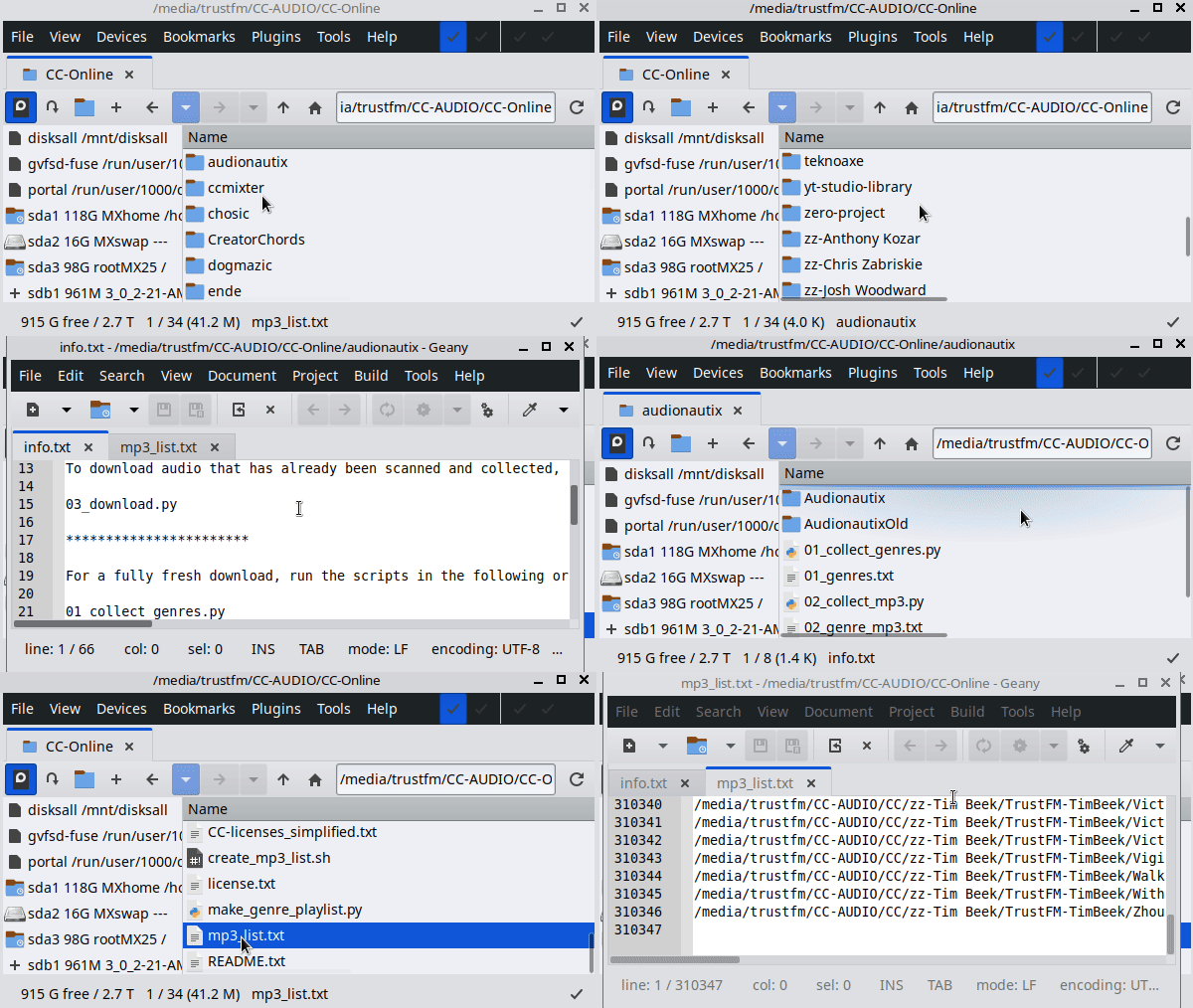
The sources can be used to discover and obtain audio according to the license terms specified by the original creator or source.
We will focus on identifying, parsing and downloading MP3 files released under Public Domain, CC0, CC BY, CC BY-SA and CC BY-ND licenses.
These licenses permit forms of sharing and use that are suitable for our intended applications, including downloading, redistributing and playing or streaming audio in public places such as cafés, restaurants, shops and workplaces, subject to the specific terms of each license.
For licenses that require attribution, such as CC BY, CC BY-SA and CC BY-ND, the required attribution must be respected when using the audio.
For CC BY-SA, additional requirements apply to adaptations, while CC BY-ND does not allow distribution of adapted material.
We do not focus on CC BY-NC licenses because they do not permit commercial use.
This is important for public and commercial environments where music may be played or streamed as part of a business or service.
The purpose of this project is therefore to identify audio sources where the published license permits the types of use required for public playback, streaming, transmission and redistribution, while keeping the original license conditions and attribution requirements intact.
Always check the license of the individual work at the original source before using it.
A source may contain works under different licenses, and the license applicable to one work does not automatically apply to another.
By the end of the CC-Audio-Sources-TrustFm procedure, you will obtain approximately 2 TB of audio, consisting of around 315,077 MP3 files licensed under Public Domain, CC0, CC BY, CC BY-SA and CC BY-ND licenses.
Creative Commons Audio Sources Sources:
- Audionautix - License: CC BY 4.0 - MP3:1136 - Size:4GB*
- ccMixter - License: PD, Multiple CC - MP3:9513 Size:38.6GB*
- Chosic - License: PD, Multiple CC - MP3:2534 Size:14.2GB*
- Creatorchords - License: CC BY 4.0 - MP3:682 Size:5.2GB*
- Dogmazic - License: PD, Multiple CC - MP3:18196 Size:117.6GB* - Register**
- ende - License: CC BY 4.0 - MP3:6875 Size:17.8GB*
- FreeMusicArchive (FMA) - License: PD, Multiple CC - MP3:38420 Size:291.6GB*
- freepd - License: CC0 - MP3:254 Size:3.4GB*
- Incompetech - License: CC BY 4.0 - MP3:4348 Size:30.7GB*
- Jamendo - License: PD, Multiple CC - MP3:186597 Size:1004GB* - Register**
- Loyalty Freak Music - License: Multiple CC - MP3:3059 Size:44.2GB*
- Machinima Sound Legacy Tracks - License: CC BY 4.0 - MP3:136 Size:964MB*
- MDK band - License: CC BY 3.0 - MP3:1192 Size:12.2GB*
- Musopen - License: PD, CC0, Multiple CC - MP3:6690 Size:64.2GB*
- Newgrounds - License: Multiple CC - MP3:2166 Size:10.3GB*
- Open Music Archive - License: PD, CC BY 4.0 - MP3:244 Size:887.6MB*
- PandaCD - License: PD, Multiple CC - MP3:17616 Size:127.7GB* - Register**
- SampleSwap - License: Multiple CC - MP3:786 Size:7.3GB*
- SilvermanSound - License: CC BY 4.0 - MP3:227 Size:1.6GB*
- Teknoaxe - License: CC BY 4.0 - MP3:5013 - Size:41.4GB*
- Youtube audio library - License: Attribution required - not required - MP3:6957 Size:42.6GB*
- zero-project - License: CC BY 4.0 - MP3:190 Size:1.4GB*
- zz-Anthony Kozar - License: CC BY-SA 2.0 - MP3:22 Size:334.5MB*
- zz-Chris Zabriskie - License: CC BY 4.0 - MP3:202 Size:718MB*
- zz-Josh Woodward - License: CC BY 4.0 - MP3:507 Size:3.2GB*
- zz-kongano - License: CC BY 4.0 - MP3:610 Size:2.3GB*
- zz-Scott Buckley - License: CC BY 4.0 - MP3:700 Size:6.3GB*
- zz-Tim Beek - License: CC BY 4.0 - MP3:205 Size:668.2MB*
As mentioned above, CC BY-NC licenses are not included.
**Free registration needed in order to make .py scripts to work.
The info.txt file documents the complete workflow for that source, including how to scan or collect available audio, identify and record the applicable license information, save the MP3 source URLs, filter the results according to the required license criteria, and download the selected audio files.
The instructions are specific to each source and may include the required commands, scripts, search methods, filtering options and output files.
Always verify the license of each individual work at the original source before using, streaming, transmitting or redistributing the audio.
Before downloading CC-Audio-Sources-TrustFm, we recommend using a Linux distribution.
The included tools and scripts are primarily written in Python and Bash and are designed to be used from a Linux command-line environment.
Linux provides the most compatible environment for running the included scripts, processing large lists of audio sources, filtering results and downloading the selected MP3 files.
Windows users may be able to run some of the Python scripts, but the included Bash scripts and Linux-oriented commands may require additional software or modifications.
Tools used by CC-Audio-Sources-TrustFm
- GNU/Linux command-line tools — standard utilities used by the scripts for file and directory processing, text processing and automation, including
grep,sed,awk,find,sort,uniq,sha256sum,cp,mv,mkdir,rm,lsand other standard Linux utilities. - Python 3 — Python scripts for scanning, parsing, filtering, processing metadata, collecting source URLs and downloading audio, using libraries such as
requests,BeautifulSoup(bs4),csv,json,re,pathlib,urllib,os,timeand other standard Python libraries. - Bash — shell scripts and Linux command-line automation.
- curl — downloading and retrieving web resources.
- wget — downloading files and web pages, including source HTML for parsing.
- Chromium Browser — accessing websites, searching sources and checking licenses and available audio.
- JDownloader — download manager for supported websites and large download collections.
- Transmission BitTorrent Client — downloading torrent-based audio archives and source collections.
- SpaceFM — fast Linux file manager, especially useful for navigating very large directories such as Jamendo collections.
- Double Commander — two-panel file manager for managing and comparing large audio collections.
- FreeFileSync — synchronizing, comparing and transferring large audio collections between storage devices.
- Geany — lightweight text editor used for viewing and editing text, CSV, TSV, HTML and script files, including very large files that can be difficult for heavier editors to handle.
- LibreOffice — opening, viewing and working with large CSV and tabular data files.
- 7-Zip — creating and extracting compressed archives, including the distribution archive for CC-Audio-Sources-TrustFm.
- mpv / DeaDBeeF / QMPlay2 / Audacious — audio MP3 player(s).
- pipewire-pulse / pulseaudio-utils / ffmpeg / xvfb / x11vnc / ssvnc - used for streaming
- 3 TB — HDD storage for the complete estimated audio collection.
- ADSL / VDSL / FTTH — Internet connection for downloading the audio.
Readme for CC-Audio-Sources-TrustFm
CC-Audio Sources by TrustFm
Source: [www.trustfm.net]
Usage:
For each CC-Audio provider, such as "audionautix", go to its dedicated folder and read the info.txt file.
You have two options: download the already scanned source, or rescan and download it.
Rescanning is useful when you want to update the source.
CC-Audio Sources comes with already scanned sources, so you can just download the sources you want.
Main Scripts :
Software: Source: [www.trustfm.net]
Usage:
For each CC-Audio provider, such as "audionautix", go to its dedicated folder and read the info.txt file.
You have two options: download the already scanned source, or rescan and download it.
Rescanning is useful when you want to update the source.
CC-Audio Sources comes with already scanned sources, so you can just download the sources you want.
Main Scripts :
- [audio_list_create.sh] lists all downloaded songs. Produces audio_list.txt.
- [mpv-player-prgX-simple.sh] plays a selected playlist (program) using mpv. Set PLAYLIST, ENABLE_SHUFFLE and AF
- [mpv-player-prgX-mix.sh] mixes a selected playlist (program) using two mpv's. Set PLAYLIST, FADE, ENABLE_SHUFFLE, STARTINDEX and AF
-
[playlister.py] produces M3U playlists using filters.
playlister.py uses the metadata (usually named zz-metadata.tsv) already included in this package.
You can update the metadata using the instructions in the info.txt file from each source.
playlister.py configuration and usage: -
[transmit-radioX-serverY.py] Transmitter settings for each radio.
Supports icecast/shoutcast/youtube.
Each radio can have up to two different servers (Y: main-backup) -
[radioX-control.sh] Pilot your radio stream.
Most common use [2] : Start Radio with MIC
Creates a Virtual Sink (speaker) + Virtual Mic ex:
pactl load-module module-null-sink sink_name=radio1_audio sink_properties=device.description=Radio1Audio
then launches mpv ex:
PULSE_SINK=radio1_audio ./mpv-player-prg1-simple.sh
or for youtube
# YouTube mode is detected automatically from the transmitter script:
# if it has SERVER_TYPE = "youtube", the transmitter starts FIRST (it creates
# the Xvfb virtual display) and the player is then started on that display
# (YOUTUBE_DISPLAY is also read from the transmitter script).
# For "icecast" / "shoutcast1" the order is player first, as before.
simple player case :
./transmit-server1-radio1.py
then
DISPLAY=:91 PULSE_SINK=radio1_audio ./mpv-player-prg1-simple.sh
mix player case :
./transmit-server1-radio1.py
then
DISPLAY=:91 PULSE_SINK=radio1_audio ./mpv-player-prg1-mix.sh
watch + pilot
x11vnc -display :91 -rfbport 5901 -localhost -nopw -forever -shared
ssvnc Vnc://localhost:1
When stream is closed [4] then
stop_player
stop_transmitters
stop_mic
Remove Virtual Sinks :
pactl unload-module "$(pactl list short modules | awk '/module-null-sink/ && /sink_name=radio1_audio/ {print $1}')" - [radioX-toggle-listen-full.sh] Listen/Stop Listening your radio stream with the virtual mic
- [radioX-toggle-listen-no-mic.sh] Listen/Stop Listening your radio stream ignoring mic
- [radioX-toggle-mic.sh] Toggle virtual mic
- [system-open-pages.sh] Open multiple pages in FireFox or Chrome. (Useful for transmitting at multiple stream servers)
- [system-toggle-listen-mic.sh] Toggle the ability to hear the system mic from the system speakers. (loopback)
- [system-toggle-mic.sh] Toggle general system mic.
- [upload-radio-history.sh] upload the history of mpv Radio streams at your web server. (use "zzz-website/radio/history/history.php" at your website to browse the transmitted history)
Set ENABLED_SOURCES to select the sources to use.
Set LINK_MODE:
LINK_MODE = "stream"Possible values:
"local" = use col_mp3_local
"stream" = use col_mp3_url (no need to download any songs)
Set USE_ABSOLUTE_PATH_IN_LOCAL_LINK_MODE
USE_ABSOLUTE_PATH_IN_LOCAL_LINK_MODE = TruePossible values:
True = absolute paths (default - recommended)
False = relative paths
Set FILTER1:
FILTER1_FIELD = "col_TitleSong"Possible values: col_Artist - col_TitleSong - col_Album - col_Genre - col_Tempo - col_Mood - col_License
FILTER1_VALUE = "Electronic"FILTER1_CONTAINS = TrueFILTER1_CASE_INSENSITIVE = TrueSet FILTER2 (optional):
FILTER2_MODE = "DISABLED"Possible values: "DISABLED" - "AND" - "OR"
FILTER2_FIELD = "col_Artist"Possible values: col_Artist - col_TitleSong - col_Album - col_Genre - col_Tempo - col_Mood - col_License
FILTER2_VALUE = "John"FILTER2_CONTAINS = TrueFILTER2_CASE_INSENSITIVE = TrueCreate the playlist:
Run:
./playlister.pyThis produces:
playlist.m3uIn the default configuration, playlister.py generates an Electro genre playlist from multiple sources in stream mode.
Tip1: playlister.py can also be used as a search tool for all available sources using their collected metadata.
Tip2: use FILTER1_VALUE ="" and FILTER2_MODE = "DISABLED" to fully search the selected sources - (include all).
Examples of playlists created with playlister.py:
Local (need songs to be downloaded)
playlist-local-ambient.m3u
playlist-local-dance.m3u
playlist-local-electro.m3u
playlist-local-happy.m3u
playlist-local-jazz.m3u
playlist-local-relax.m3u
playlist-local-rock.m3u
Stream (no songs to be downloaded)
playlist-stream-ambient.m3u
playlist-stream-dance.m3u
playlist-stream-electro.m3u
playlist-stream-happy.m3u
playlist-stream-jazz.m3u
playlist-stream-relax.m3u
playlist-stream-rock.m3u
The playlists can be very large and work best with:
mpv - DeaDBeeF - QMPlay2 - Audacious audio players.
GNU General Public License, Version 2, June 1991 (GPL-2.0-only)
The complete license is included in: license.txt
Third-party data and source material:
Remains subject to the license and terms applicable to the original source or work.
Music:
No music files are included in this archive.
This archive contains scripts, source information, metadata and lists used to locate and process audio published by third parties.
Important:
Always check the license and usage conditions of each individual work at the original source before downloading, using, playing, streaming or redistributing it.